
MyPTV on your LG TV
6 steps, about five minutes. You need: A Premium Multi plan, a MyPTV account and your phone.
Because of TV hardware limits, Multiview and timeshift are not available on LG TV. Every other Premium feature works.
Get Premium Multi on your phone
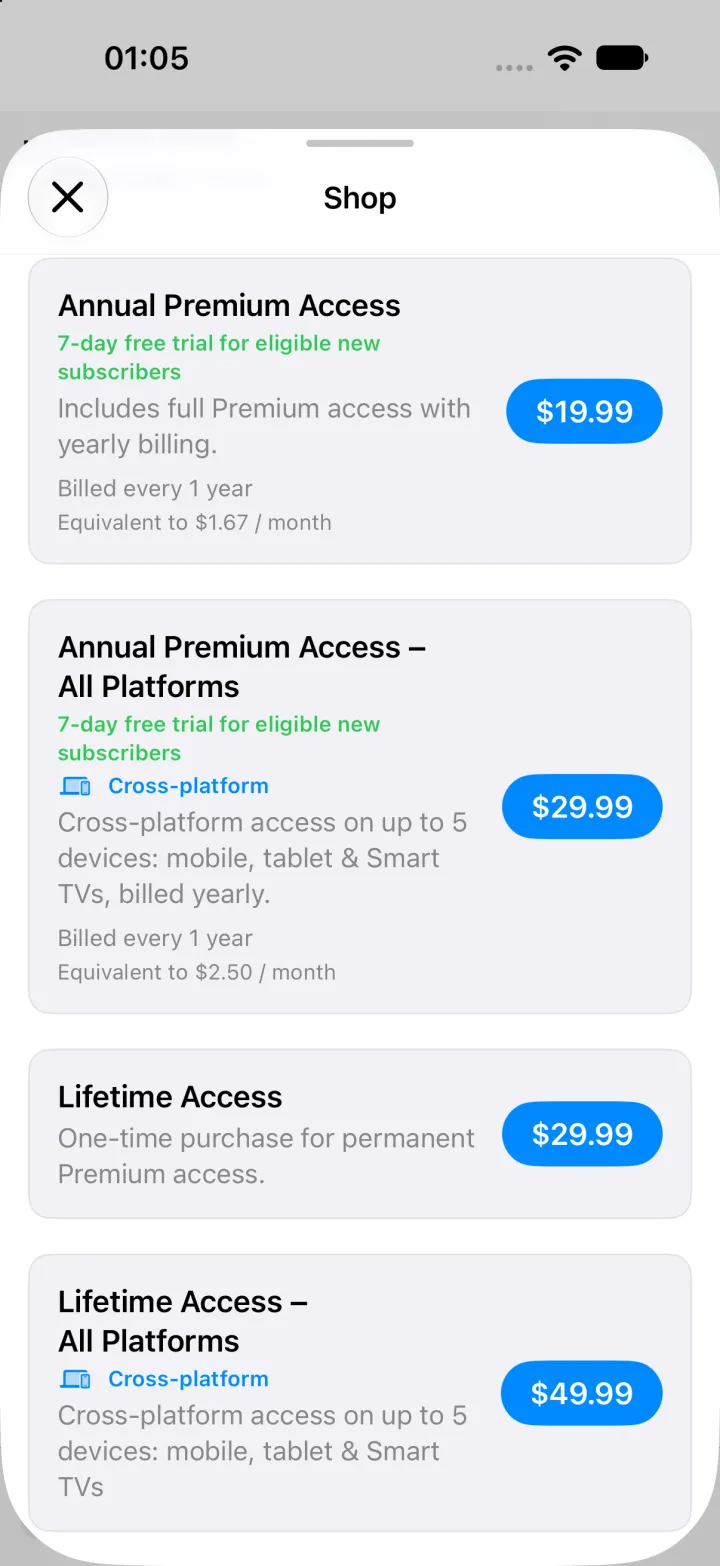
Install MyPTV from the App Store or Google Play and open the Shop. Choose a plan marked Cross-platform — Annual Premium Access or Lifetime Access, All Platforms. Plans without that label do not unlock Smart TVs.
Need a hand?
Premium is not active on the TV
Check that your plan is Premium Multi and that the TV is signed in with the same MyPTV account. Then open Settings › Premium and select Check again.
The QR code expired
Codes expire after 10 minutes. Open the sign-in screen again to get a new code, or choose Use email instead.
Where are Multiview and timeshift?
Samsung Tizen and LG webOS TV hardware cannot run them, so they are not offered there. They work on iPhone, iPad, Mac, Apple TV and Android devices on the same plan.
Device limit reached
Premium Multi works on up to 5 devices. Remove one from your account in the app to free a slot.